The Stop-Motion Illusion: Why Tiny Changes Read as Movement
Learn how stop-motion animation turns small, controlled changes between still frames into readable motion, from choosing a subject to reviewing the sequence.
A clay figure stands beside a mug on a kitchen table. In one photograph, its hand is at its side; in the next, the hand has shifted toward the mug. Play those images in sequence and the figure seems to reach. Stop-motion animation depends on that small bargain between separate still frames and the motion a viewer supplies between them.
To make the illusion readable, work in an orderly loop: choose one clear action, set up a stable shot, plan the movement, capture frames, then review and adjust. Each choice affects what the audience perceives—not just whether the subject changes position, but whether it appears to move with intention.
Stop-Motion Animation and Perception
A still photograph records a subject at one instant. When a sequence of photographs is played back in quick succession, the visual system links the changing positions into apparent motion. The screen never contains the continuous movement of the figure; it presents a succession of images that the viewer interprets as one action.
The changes need to connect. If a character's hand jumps from its side to the mug's handle, the audience may read a sudden pop rather than a reach. Smaller changes make the in-between action easier to imagine, while consistent changes help movement feel intentional. A sequence can still contain a large shift for a deliberate snap, stumble, or transformation.
Movement also depends on what stays still. If the figure and the table both drift unexpectedly, it becomes harder to tell whether the character is moving or the whole scene is sliding. Stable scenery gives the eye a reference, and a clear silhouette makes the subject's changing pose easier to follow.
Choose One Clear Action
Begin with a simple action that has an observable start and finish: a puppet turns its head, a paper bird opens its wings, or a ball rolls to a stop. Decide what the audience should notice. A small action can be expressive if the important change—such as a turn toward another character—is visible from the camera's position.
Before building a long sequence, describe the action in ordinary language. “The puppet looks at the mug” is easier to stage than “the puppet moves.” The first tells you which body part changes, what draws its attention, and where the action ends.
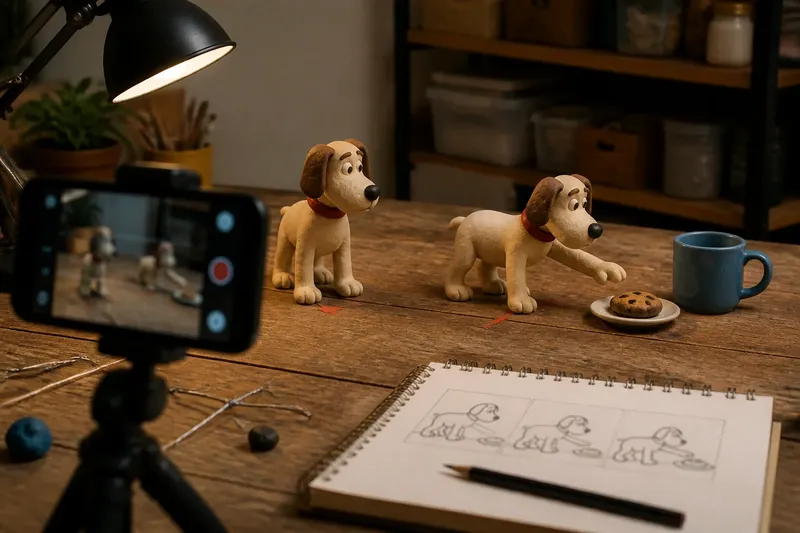
For a useful invented scenario, say you want a clay dog to sniff a cookie on a plate. Start with its nose pointed forward and the cookie visible in the frame; gradually angle the head toward the plate, then bring the nose closer. On playback, the audience should be able to follow the dog's attention rather than mistake the movement for a series of unrelated head positions.
Lock the Set and Camera
Set the camera on a tripod or a firm tabletop stand and keep the composition fixed while animating. A phone can work with a stop-motion app that lets you view the previous frame as a translucent overlay, often called onion skinning. That overlay makes it easier to compare the current pose with the last one.
Secure the subject's base and any loose scenery. A small piece of reusable adhesive putty can hold a lightweight prop in place, while a wire armature inside a puppet can support a pose. Keep hands and tools out of the frame when you take each picture, and check that the camera has not shifted before continuing.
Light the set so it remains consistent between exposures. Daylight through a window may change during a session; a fixed lamp is easier to keep steady. Avoid touching the light or moving objects near it while animating, since changes in shadows can make the set appear to flicker even when the puppet's movement is smooth.
Focus and exposure should remain consistent as well. If your camera app permits manual controls, set focus and exposure before capturing the sequence, then avoid altering them during the shot. Follow the camera, app, material, and equipment instructions where relevant.
Plan the Frame Changes
Think of each photograph as a pose in a chain. Before the first frame, decide where the action begins, where it ends, and which intermediate poses will make the change legible. For a turn, those intermediate poses might include a slight head angle, a more obvious turn, and a final position facing the target.
Move only what needs to move. If the head turns but the feet remain planted, the audience reads a head turn. If the torso, feet, and nearby props all shift at once, the action may become difficult to parse. This does not mean every pose must be rigid: a little accompanying movement can make a gesture feel connected to the rest of the body.
Keep a short written note or sketch of the intended poses beside the set. It can record which way a joint bends or where a prop should remain. The note is a continuity aid, not a demand for mechanical precision; small, controlled variation can keep handmade animation from feeling lifeless.
Capture and Review
Take one frame, make a small adjustment, and take the next. Use the onion-skin overlay or compare the live view with the last photograph before each exposure. If a change looks larger than intended, ease the subject back to a more connected pose before carrying on.
After capturing a short run of frames, play it back at the intended viewing speed. Look for three things: whether the action reads at a glance, whether the subject seems to jump, and whether anything in the background flickers. A sequence that looks clear as individual poses can feel abrupt in motion, so playback is part of the making process rather than a final ceremony.
If the action feels jumpy, inspect the transition where it breaks. Add or reshoot a pose between the two positions, or reduce the size of the movement in that part of the sequence. If it feels sluggish, remove a repeated pose or make the change more pronounced. These are editorial choices: the right adjustment depends on the character and the intended style.
Common Stop-Motion Questions?
Why does a puppet seem to jump?
A jump often comes from a pose changing too much between adjacent frames, or from the subject shifting in an unintended direction. Compare the neighboring images and add a connecting pose where the action needs one.
How do I make movement look smoother?
Keep changes between poses small and consistent, and review the sequence at its playback speed. Smoothness comes from how the images connect, not from adding detail to every object in the frame.
Why does the background flicker?
Changing light, shifting scenery, or a bumped camera can make fixed parts of the set vary between frames. Keep the setup stable and inspect the background during playback, especially around sharp changes in shadows.
Can stop-motion use deliberately uneven movement?
Yes. A lurch, pause, or sudden shift can suit a particular character or action. The useful distinction is whether the unevenness appears intentional and readable, rather than caused by an unnoticed change in the setup.
Let the Viewer Connect
Stop-motion animation does not need to hide that it is built from photographs. Its appeal often comes from the visible handmade object and the care of its changing poses. The aim is to make each still image relate clearly to the next, so the audience can supply the movement without losing track of the action.
When reviewing a sequence, watch once without stopping to inspect individual frames. If the action is clear, the tiny changes are doing their work. If attention keeps catching on a stray shift, fix that specific transition; the viewer should be following the puppet, not conducting a search for the camera bump.